Introduction to Claude Code
Introduction to Claude Code
A hands-on training using a real website migration as your first project
Who This Is For
Marketing strategists, SEO consultants, and PPC specialists who want to start using AI to do technical work — without becoming developers. If you've used ChatGPT for writing, this is the next level: using AI to actually build and change things on your computer.
What Is Claude Code?
Claude Code is an AI coding assistant that runs in your terminal. You describe what you want in plain English, and it writes code, creates files, runs commands, and builds real projects — while you direct and verify. Think of it as having a developer on call who works at your pace and explains everything along the way.
How This Training Works
Instead of abstract exercises, you'll watch a real project from start to finish: rebuilding a client's website (corerestoreinc.com) that was locked behind a vendor who wouldn't release the source code. Every concept is demonstrated in context.
Course Outline
Part 1: Initial Setup and Planning
Setting up Claude Code, creating a project, and writing a project brief (CLAUDE.md) — the key document that gives the AI context about what you're building and why.
Part 2: Overcoming Speedbumps and Permissions
What happens when things don't work on the first try. How to read errors, adjust permissions, and troubleshoot — the normal reality of working with any tool.
Part 3: Version Control and Monitoring Progress
Using Git and GitHub to track every change Claude Code makes. How to stay in control, review what the AI did, and roll back if needed.
Part 4: Human + AI Visual Verification
How to check the AI's work — comparing outputs against what you expect, combining your judgment with AI-assisted review.
Parts 5.1 & 5.2: The Feedback Loop
The core skill: reviewing output, describing what's wrong, sending it back, and verifying the fix. This iterative loop is how you'll use Claude Code for any task, not just websites.
Watch Part 5.1 | Watch Part 5.2
Part 6.1: Choosing Where to Deploy
A plain-language comparison of hosting options:
Cloudflare Pages — simple, cheap, needs Cloudflare DNS for custom domains
Vercel — easy, can get pricey with backend features
GitHub Pages — free, fully static only
DigitalOcean / AWS / GCP — for complex apps with databases
Part 6.2: Deploying to Cloudflare
Pushing a finished project live — from local machine to a URL anyone can visit.
Part 7: Recap and Next Steps
What you learned, how to apply it to your own work, and where to go from here.
Key Takeaways
Claude Code is a general-purpose tool — website builds are just one use case; the same skills apply to scripts, automations, data work, and more
The skill is directing, not coding — writing clear instructions and verifying output is what matters
The feedback loop is everything — review, describe what's off, iterate. That's the workflow for any AI tool
Version control is your safety net — nothing is permanent, everything is reversible
Start with a real project — the best way to learn a tool is to use it for something you actually need done
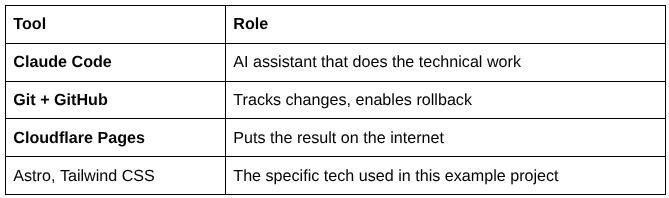
Tools Covered
9 videos. One real project. Walk away knowing how to use AI for technical work.
