GHL Call Recording & Transcript Configuration
Table of Contents:
Referral Partner Marketing Program 1
SECTION 1: ENABLE CALL RECORDING IN GHL 2
Step 1: Navigate to Correct Sub-Account 1
Step 2: Go to Phone Settings 2
SECTION 2: VERIFY RECORDINGS & TRANSCRIPTS 3
SECTION 3: PREVENT INCORRECT BRAND DISPLAY 4
SECTION 4: ROUTING ISSUE TROUBLESHOOTING 5
SECTION 5: STANDARDIZATION REQUIREMENT 6
SECTION 6: QUALITY CONTROL CHECK 7
Take Quiz Here after reading this SOP to help Kyle identify training gaps 1
Referral Partner Marketing Program
This SOP ensures that all outbound and inbound calls inside each client Sub-Account are properly recorded, transcribed, and labeled under the correct company name.
This supports quality control, training, and client reporting requirements outlined in the Referral Partner Marketing Program SOP and aligns with the Sub-Account standardization discussed in the GHL Sub-Account Setup call.
OBJECTIVE
Ensure call recording is enabled for every client Sub-Account
Ensure proper recording disclosure message is configured
Ensure transcripts are accessible inside contact records
Prevent calls from routing incorrectly
Maintain compliance and quality assurance standards
WHO THIS APPLIES TO
SDRs
Account Managers
Operations
Any team member placing calls from a client Sub-Account
SECTION 1: ENABLE CALL RECORDING IN GHL
Step 1: Navigate to Correct Sub-Account
Log into GoHighLevel
Click the location switcher in the top left
Select the appropriate client Sub-Account
Do NOT perform this in the master Restoration Inbound account.
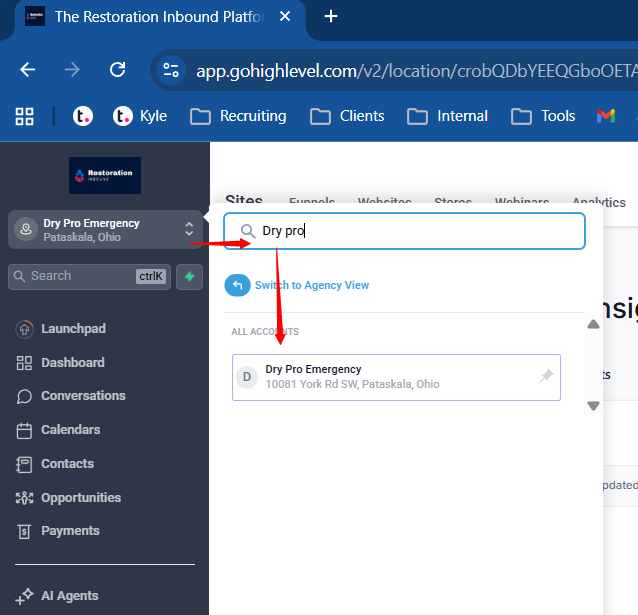
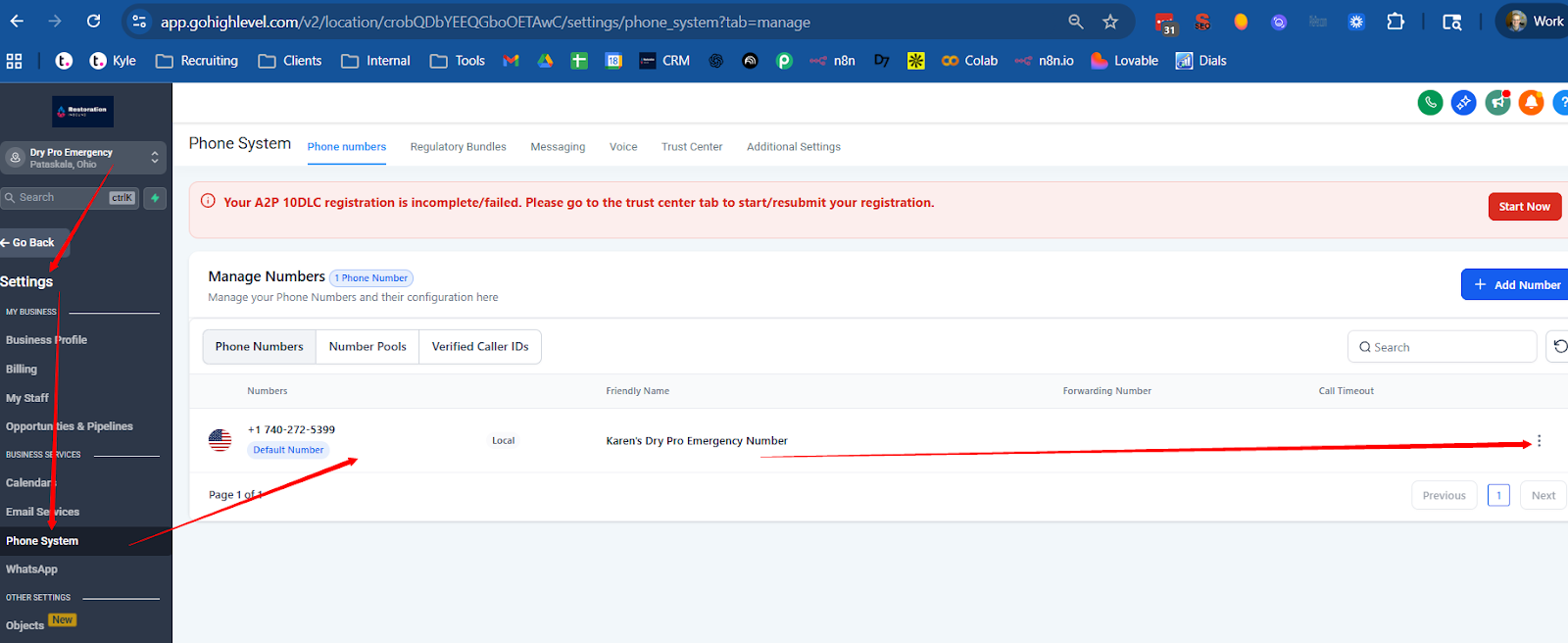
Step 2: Go to Phone Settings
Click Settings
Click Phone System
Locate the phone number assigned to the Sub-Account
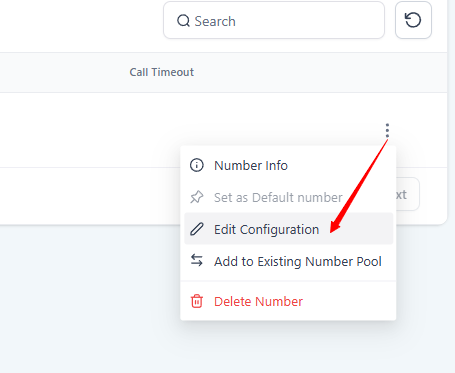
Click the three dots to the left of the phone number
Click Edit Configuration
Step 3: Enable Recording
Find the Call Recording toggle
Turn ON call recording
Check the Call Recording Message Box
*Only for Clients in States below: Add “Thank you for calling [Company Name]. This call will be recorded for quality purposes.”
Save changes
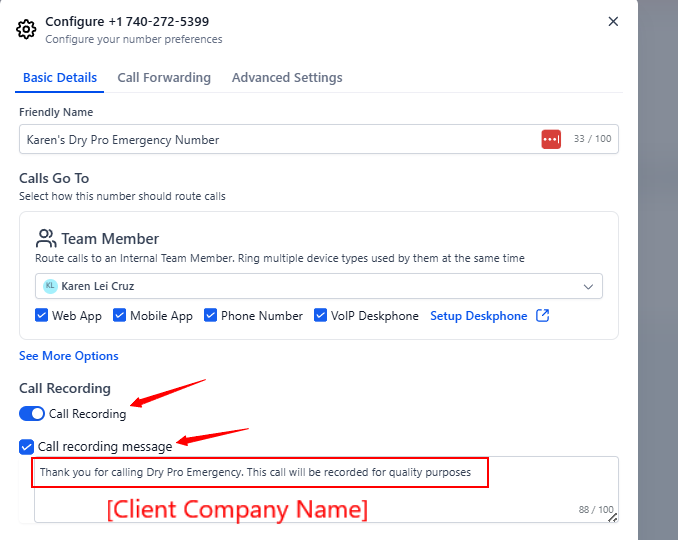
Call Recording Message is currently ONLY required if the Client is located in one of the following states (otherwise leave “Call recording message” unchecked):
California
Connecticut
Delaware
Florida
Illinois
Maryland
Massachusetts
Montana
Nevada
New Hampshire
Pennsylvania
Washington
SECTION 2: VERIFY RECORDINGS & TRANSCRIPTS
After enabling:
Place a test call from the Sub-Account
Navigate to Contacts
Open the contact record
Confirm:
Recording file appears
Playback works
Transcript appears
If transcript does not appear:
Verify the Sub-Account call transcription is checked
Verify recording was enabled before the test call
Refresh contact record screen
SECTION 3: PREVENT INCORRECT BRAND DISPLAY
Issue:
Calls and texts were appearing as “Spam Likely” or “Restoration Inbound” instead of client name.
Fix:
Inside each Sub-Account:
Go to Settings → Business Profile
Confirm:
Business Name matches official legal name
EIN-backed verified name matches
Ensure A2P registration is submitted under correct business entity
Confirm CNAM and SHAKEN/STIR are configured per number
If CNAM and SHAKEN/STIR aren’t configured, then post in client’s discord channel “{Client} doesn’t have CNAM & SHAKEN/STIR configured, Official Business Name and EIN are needed.” Tag Kyle and Account Manager in this message.
All SMS and outbound caller ID must reflect the client’s name, not the parent agency.
SECTION 4: ROUTING ISSUE TROUBLESHOOTING
If outbound calls route back to Vlad’s number or another unintended phone:
Go to Settings → Phone System → Number Configuration → Calls Go To → (Select Team Member)
If Team member isn’t showing in list, go to Agency Level → search team member name → click “edit” →
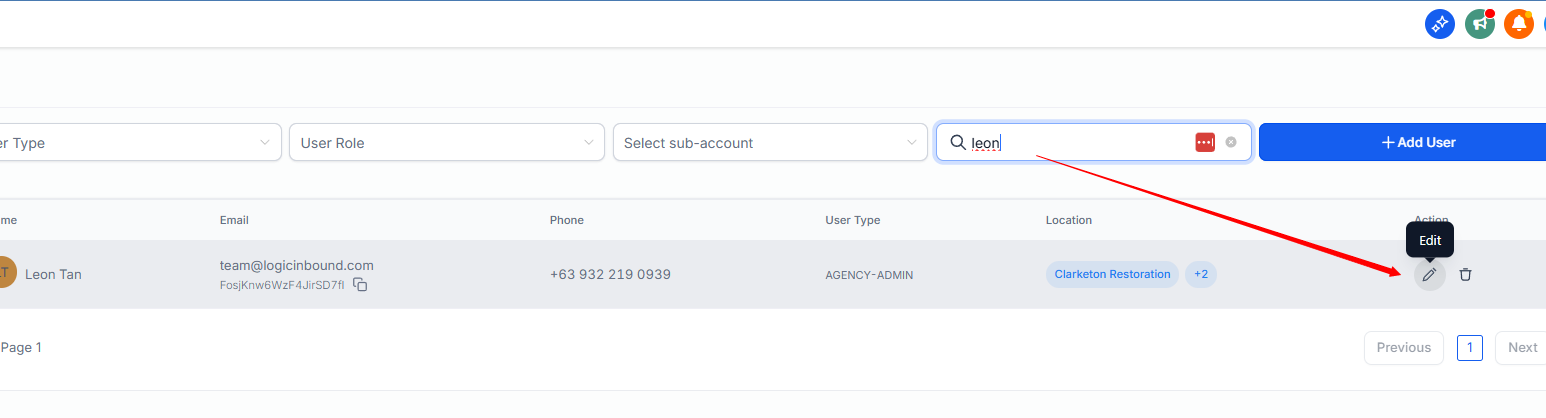
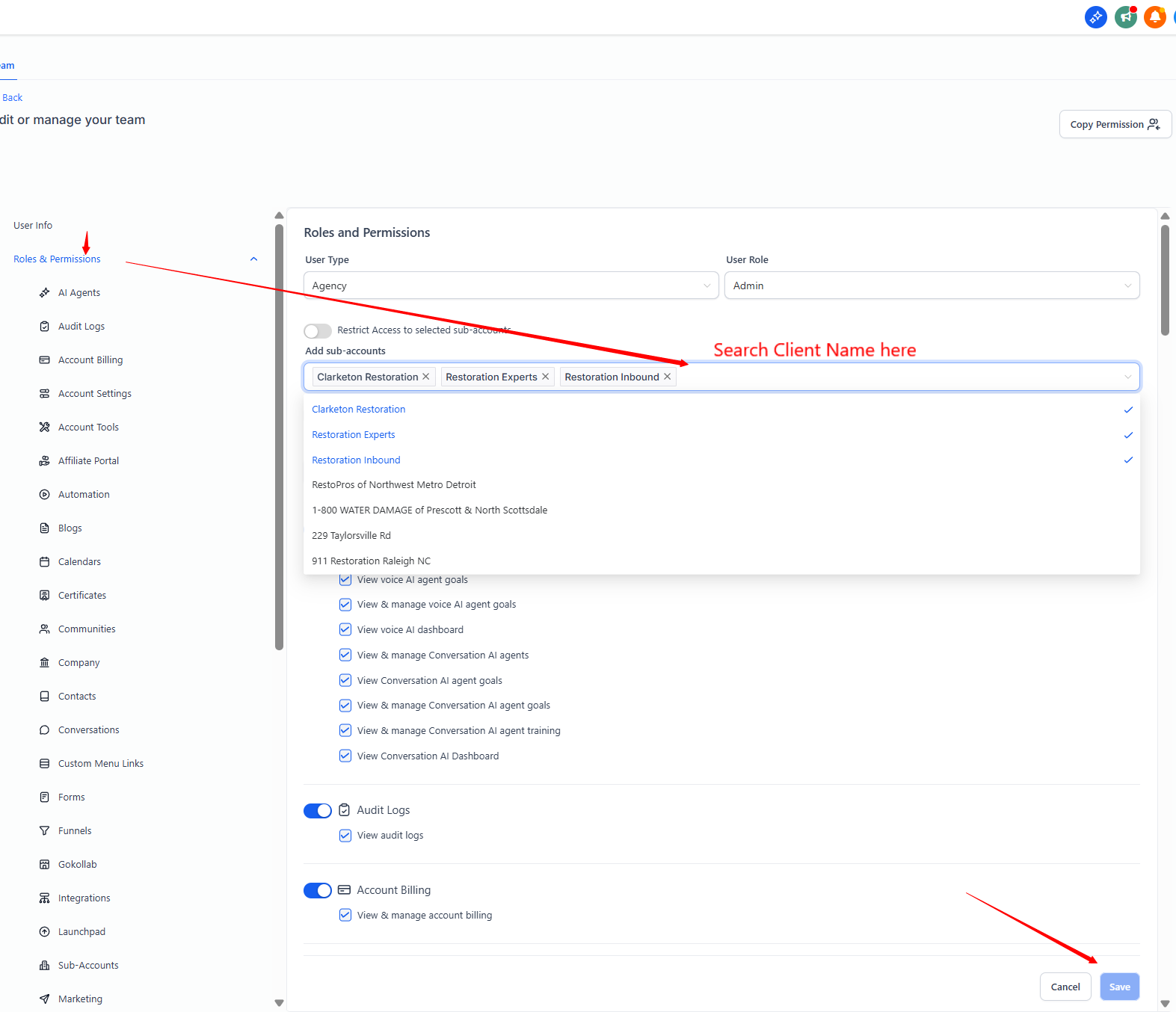
Verify:
No forwarding rule exists to master account
No default failover number is set to agency line
Check:
Assigned user routing
Missed call routing settings
Run test call and confirm behavior
If issue persists:
Capture screenshot of contact
Provide call timestamp
Provide dialed number
Escalate to Kyle
SECTION 5: STANDARDIZATION REQUIREMENT
Every Referral Client Sub-Account must include:
Dedicated local area code number
Call recording enabled
Recording disclosure message configured
Proper CNAM
A2P registered
Verified EIN and legal name
Transcript visibility confirmed
Client outreach will be inhibited until this checklist is complete.
SECTION 6: QUALITY CONTROL CHECK
Account Manager must verify:
1 test call recorded and stored
1 transcript visible
Correct branding displayed
Routing validated
Number purchased matches approved area code
Document completion in internal tracking sheet.
ESCALATION PROCESS
If recording fails:
Confirm Sub-Account selected
Confirm recording toggle enabled
Confirm call placed after configuration
Re-test
Escalate to Kyle with:
Sub-Account name
Phone number
Screenshot of settings
Contact link
Escalation Template Message for Discord: (Below)
Kyle I’m having trouble with {Subaccount Name} - {phone number} - Issue: {ie calls not being recorded}
SUMMARY
This SOP ensures:
Every call is recorded
Every call is properly branded
Every client Sub-Account operates independently
SDR workflow remains clean across 5–6 accounts
Reporting and payout validation remain accurate
This supports scalable execution of the Referral Partner Marketing Program and ensures clean fulfillment infrastructure per client .
If followed consistently, this eliminates:
Misbranding
Missing recordings
Compliance gaps
Cross-account confusion
Routing errors
